For anyone working in IT or networking, understanding the OSI and TCP/IP models is essential. These are the frameworks that explain how data moves across networks and help professionals troubleshoot issues and optimize performance. Here, ViewSoft Academy will provide you with everything you need to know about TCP/IP and OSI Models in Action, providing you with practical skills to master networking fundamentals.
Understanding the OSI and TCP/IP Models
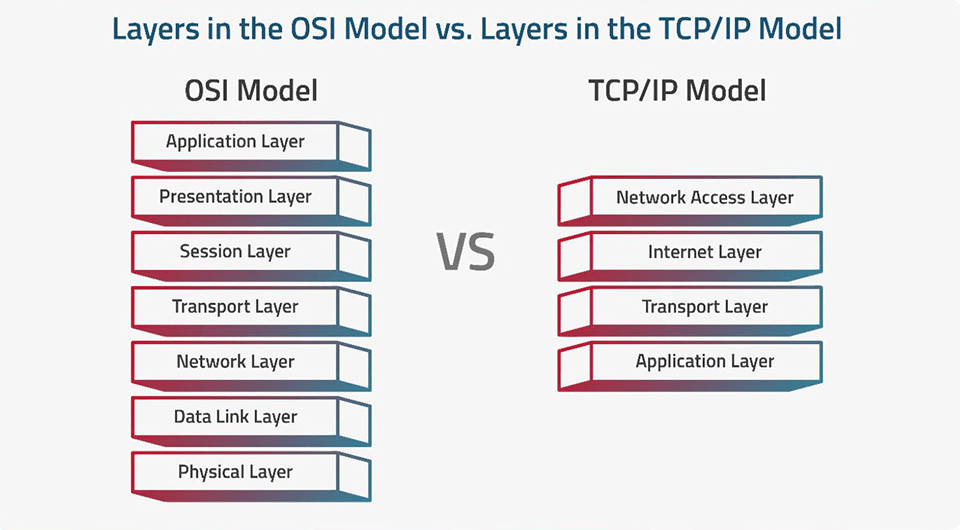
The OSI and TCP/IP models are conceptual models that explain network communications with different levels of complexity and practical usage. The OSI model has 7 layers and is essentially theoretical; however, it is also complex because it allows deep analysis of networks. The TCP/IP model has 4 layers and is used as a practical model that the Internet and the real world are based on.
OSI Model
- Structure: 7-layer, theoretical model for conceptualizing and teaching network communication.
- Layers: Physical, Data Link, Network, Transport, Session, Presentation, Application
- Focus: Standardization, deep analysis, where each layer serves distinct, significant purposes
- Usage: Helpful for troubleshooting and educating. Because of its deep level of detail in the separation of layers, the OSI model is easier to identify issues
TCP/IP Model
- Structure: 4-layer, practical model
- Layers: Network Access, Internet, Transport, Application
- Focus: Practical, simplified application where several functions of the OSI model are combined into fewer layers
- Usage: The de facto model used for actual networking and operational purposes
What are the Key Differences Between TCP/IP and the OSI Models?
Here are some of the key differences between TCP/IP and OSI Models, including:
| Feature | OSI Model | TCP/IP Model |
| Full Form | Open Systems Interconnection | Transmission Control Protocol / Internet Protocol |
| Number of Layers | 7 (Physical, Data Link, Network, Transport, Session, Presentation & Application) | 4 (Link, Internet, Transport and Application) |
| Development | Developed by ISO | Developed by DARPA for the Internet |
| Approach | Conceptual framework for standardizing networking functions | Practical model focused on real world protocols and communication |
| Layering Flexibility | More rigid, each layer has strict functions | More flexible, combines some OSI layers into a single layer |
| Protocol Dependence | Protocol-independent | Protocol-dependent (TCP, IP, UDP, HTTP, etc.) |
| Usage | Primarily used as a teaching tool and reference model | Widely used for real-world networking and Internet communication |
| Encapsulation | Data is encapsulated layer by layer | Similar, but fewer layers make encapsulation simpler |
| Practical Relevance | Mostly theoretical | Highly practical and implemented in modern networks |
| Example Protocols | X 25, IPX | TCP, IP, HTTP, FTP and SMTP |
TCP/IP and OSI Models in Action
Data travels through layers while communicating (Application → Transport → Network → Data Link → Physical).
Each layer has a specific function: format, delivery, addressing and transmission. Models are useful when troubleshooting network connectivity issues because you can identify problems at specific layers.
For example, if you are able to access the Internet but are having difficulty accessing one specific website-slow or not working. You have no idea why. It could be a route issue (the network layer) or it could be a physical connection (the physical layer) issue.
Hands-On Packet Tracer Examples
Cisco Packet Tracer is a valuable simulation-based tool that allows a student to play around with networks and devices without needing to access actual hardware. Here’s an example that you can do with Packet Tracer to explore TCP/IP and OSI concepts.
Example 1: Ping a device to a device
- Create a snapshot network with two PCs connected to a switch
- From one PC, send a ping to the other PC.
- In Packet Tracer, you will see the entire packet journey from the sender’s PC to the receiver’s PC through each layer. You will see the encapsulation at the transport layer, the addressing at the network layer and the delivery at the data link layer and physical layer.
Example 2: Small Network Simulation
- Create your own network with one or more routers, switches, and end-devices.
- Set up IP addresses, then connectivity-test whether the device is a PC by pinging, and test the route by working with tracert.
- In the header of the packet in Packet Tracer you can even see how TCP/IP and OSI layers interact to deliver data successfully.
What are the Advantages of Understanding TCP/IP and OSI Models for IT Professionals?
For IT professionals, here are several advantages of understanding TCP/IP and OSI models, some of which include:
Problem Solving: These frameworks allow users to troubleshoot and find the source of network issues from a layer or a layer up or down.
Network Architecture: The practical design of TCP/IP is important for building efficient and scalable networks. The OSI model provides a more elaborate design that can be considered very closely to the technical design aspects.
Security: Understanding how data is handled through every layer of a network allows you to find points of weakness and build strong security at the appropriate levels of the network stack.
Standardized Language: These architectures provide a standardized and common lexicon to discuss and understand how networks work, enhancing discussions and common understanding of technical teams.
Fundamental Knowledge: They provide a basic understanding of how networks work, which veterans in IT as viable and any professional in IT should have it from the Networks Manager and Software Development, etc.
Conclusion
To sum up everything that has been stated so far, the above given information on the topic “Investigating the TCP/IP and OSI Models in Action” states that it is crucial to understand OSI and TCP/IP models for networking and troubleshooting. Moreover, tools like Packet Tracer can make learning more effective and practical. Enroll at ViewSoft Academy if you want to gain hands-on experience and become a professional in networking.
FAQs Regarding Investigating the TCP/IP and OSI Models in Action
Question 1. Why are the OSI and TCP/IP models important in networking?
Answer. OSI & TCP/IP models are crucial for networking because these models provide a layered framework that helps to simplify communication, allow for standardization and facilitate problem solving.
Question 2. How do TCP/IP and OSI models help in troubleshooting network issues?
Answer. TCP/IP and OSI models help in troubleshooting network issues by providing a layered framework that breaks down communication into smaller and manageable components.
Question 3. What are the common protocols associated with each layer of TCP/IP and OSI?
Answer. Some common protocols include HTTP, FTP & DNS at the application layers, TCP & UDP at the transport layer and IP, ARP & ICMP at the internet/network layer.
Question 4. How do I visualize data flow using the OSI and TCP/IP models?
Answer. To visualize data flow using the OSI and TCP/IP models:
- Imagine a layered pipeline where data is encapsulated
- As it travels down the stack on the sender
- And decapsulated as it travels up the stack on the receiver